If you run an ecommerce website, image optimisation is something that you should never ignore. When it comes to driving search traffic, image optimisation plays bigger role. Most ecommerce site owners often neglects image optimisation when it comes to SEO and site optimisation.
Did you know that renaming the images with keywords will get your site rank high on Search Engines? Not only that, image optimisation also helps with conversion optimisation as well as driving traffic to your website.
Here are few of just many reasons why you should consider optimising product images on your website.
Tip1: Name your image Descriptive and easy to understand language.
I have seen many e-Commerce website or websites in general with names of images written as SCM221212.JPG. This does not make sense to me as human, how search engines are going to understand what the image it about?
For example, if you sell Nikon D5200 camera, all images for that products should be named with below combinations.
- Nikon D5200
- Nikon D5200 Camera
- Buy Nikon D5200 Camera
- Nikon D5200 DSLR Camera
By following above naming conventions, you are already impressing search engines and helping your products to rank higher for number of keywords.
Tip2: Optimise your alt Tags & title tag for your images
Alt attributes or Alt tags, represent information about your product image in the event your image is not loaded on the site yet. It is also the name of the image that best describes the picture.
This alt tags also adds value to your SEO. Adding proper alt tags to the images on your website can help your website achieve better search engine rankings and helps you to associate your target keywords with your product images. As a matter of fact, using alt tags, you have the best chance to appear on google Image search.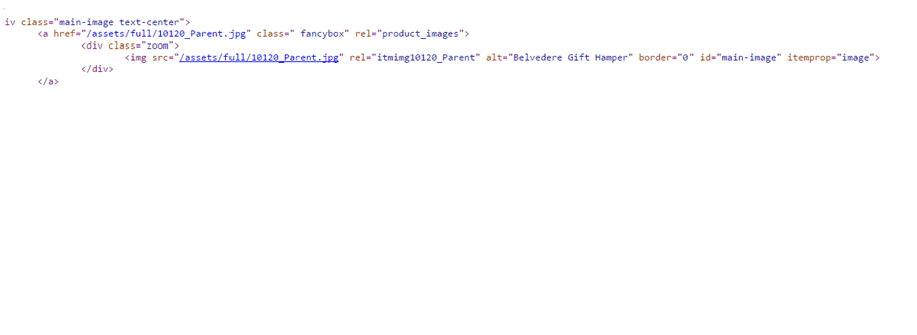
Tip 3: Make sure to use surrounding text matches your image alt and title tag
One of the key ranking factors in SEO is the use of text around images. Make sure that your text surrounding your images are optimised and is relevant to your image alt tags. When search engines crawls your images, it also crawls your surrounding texts.
You should optimise the followings.
- Image Captions
- Title of the page
- Text and keywords of the page.
tip 4: Reduce image file size
I usually see many websites with large image files which are not optimised for web browsers. These images are straight used from digital cameras. Image file size is the huge factor which affects your page load time. Slower loading pages are harder to rank. If you optimise images to load faster without compromising the quality and size of the picture, you could be helping your site rank better on search engines. Search engines like google likes faster loading website.
You should optimise your images for responsiveness on the screen too. I have listed few tools to help you do this easily.
http://webresizer.com/resizer/
Tip 5: Add small and large version of each picture:
While optimising images for web, you don’t want to neglect the user experience. When users are buying your products, they would like to see high resolution products.
You should provide your visitors to view small photos with an option to view large image size. This is how you should arrange your pictures.
- Small one for the webpage that will allow faster loading
- Bigger one the user clicks to enlarge in a pop-up window
Tip 6: Add variety of images for each products with different angles
When users search for products online, they often want to look at the product from different angle. For example, if you are planning to buy a laptop and if you are presented with just one front image of laptop, would you buy it straight from that site unless you know that laptop really well?
In addition to above, by displaying various dimensions and angles of your products, you’ll have more pictures to rank and you multiply your chances of increasing search traffic.Adding different dimensions and angles of your products also helps you improve your conversion rates and sales, especially when it comes to higher priced items. This allows the visitor to experience the product fully prior to making a purchase decision.
Tip 7: Use Image sitemaps
If you want your sites to rank higher on google image search, google lets you upload image sitemap. Web crawlers and spiders can’t crawl images that are not directly called out in pure HTML. In other words, if you use javascript or image pop ups, your images are not going to be indexed by search engines. So in order to let them know about your images, you should consider the image sitemap.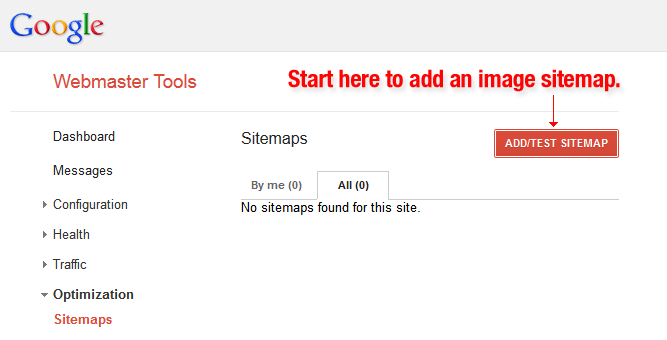
You can view the guidelines to submit image sitemap here.
Conclusion
The entire point of optimizing your images is to help increase your bottom line. We’ve talked about reducing file sizes and getting the search engines to index them-the next thing for you to do is test in terms of what works best for your SEO efforts and which method helps you rank higher and convert better.















