Introduction
HubSpot is an all-inclusive platform that streamlines website design with its robust suite of tools and features. This expanded Hubspot Web Design guide delves deeper into each stage of using HubSpot’s website design capabilities, from initial setup to advanced customisation.
Getting Started with HubSpot CMS
HubSpot Developer Sandbox Account
Before diving into website creation, setting up a free Developer Sandbox Account is crucial. This environment allows you to experiment and build without affecting live data.
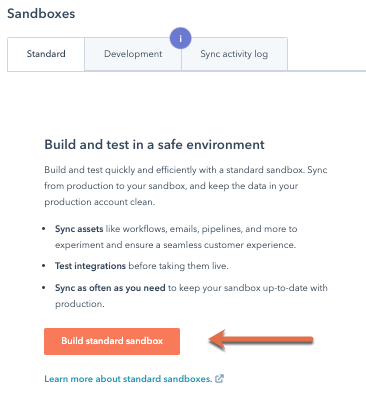
Create and manage standard sandbox accounts
To create a standard sandbox account:
- In your HubSpot account, click the settings icon in the top navigation bar.
- In the left sidebar menu, select Sandboxes.
- To create a new sandbox, click Build standard sandbox.
- On the Create screen, under Name your sandbox, enter the name of the sandbox.
- In the bottom right, click Next >.
Installation of Local Development Tools
To harness the full power of HubSpot, install the HubSpot CLI using Node.js.
This setup enables local HubSpot Web development, providing a smoother integration with your existing development workflow.
Building and Customising Your Website
Creating and Using Themes in HubSpot
When starting with HubSpot CMS, one of the first steps is creating a unique theme using the HubSpot CLI (Command Line Interface). The command hs create website-theme your-theme-name initialises a new project directory filled with essential files and folder structures necessary for a website theme. This theme serves as the skeleton of your website, providing a cohesive design framework which can be consistently applied across multiple pages.
This folder structure includes templates, modules, and other assets needed to build a comprehensive web experience. Each theme can be customised extensively, allowing you to maintain brand consistency while also implementing unique design elements across various pages.
Customisation with Drag-and-Drop Editor
Once a theme is in place, HubSpot’s drag-and-drop editor empowers even those without technical skills to construct and modify web pages. This editor provides a visual interface where you can select from various layout components like text boxes, images, buttons, and even custom modules, and simply drag them onto your web page.
The editor also facilitates rapid iteration and prototyping, as changes are visible in real-time and can be previewed across different device types to ensure responsiveness. This capability is crucial for maintaining a high standard of design while accommodating the functional needs of a diverse web audience.
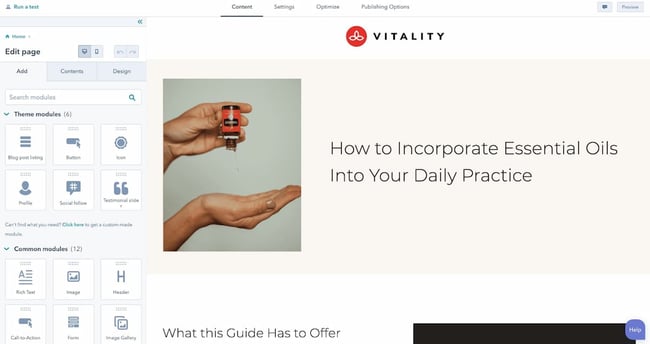
This intuitive process not only speeds up the design phase but also democratises web development within a company, enabling team members who may not have deep coding knowledge to contribute effectively to the website’s creation and ongoing management.
For a deeper understanding and detailed tutorials on how to fully leverage these tools, you may refer to the HubSpot developers guide here.
Advanced Features for Enhanced Functionality
Dynamic Content with HubSpot Sales CRM Integration
Integrating your CRM with HubSpot enables the delivery of dynamic content that can adapt in real time to user interactions and data. This process, known as HubSpot CRM Integration, enhances your website by allowing for the personification of content based on visitor behavior and preferences. For instance, based on past interactions or purchases, a returning visitor might see recommendations specifically tailored to their interests, dramatically improving user engagement and satisfaction.
Developer Tools and Resources
HubSpot provides a rich suite of developer tools including APIs and custom modules that allow for extensive customisation and functionality. These tools are indispensable for developers looking to enhance website design beyond standard offerings. Whether you’re aiming to integrate third-party applications, pull data from external databases, or customise the user interface, these tools provide the necessary capabilities.
Efficient Content Management
HubSpot Content Management is crucial for keeping your website current and engaging. HubSpot’s CMS facilitates easy management of your content lifecycle, from creation through to archiving. This system ensures that your website remains dynamic and can respond quickly to the changing demands of your audience or updates to your product line.
For effective SEO and user engagement, consider focusing on keywords like “content management system,” “updating website content,” and “HubSpot CMS features,” which are commonly searched by users looking for solutions to manage web content efficiently.
Testing and Optimisation
A/B and Multi-Variant Testing
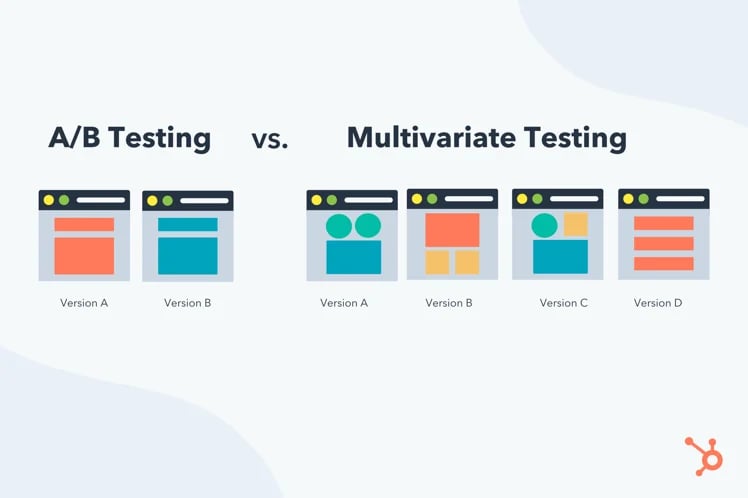
A/B testing and multi-variant testing are powerful tools in HubSpot that allow you to optimise your website by comparing different versions of a page to determine which performs better in terms of user engagement and conversion rates. In A/B testing, two versions (A and B) are tested against each other, while multi-variant testing involves multiple variables being tested simultaneously to understand how different combinations affect user behavior.
Effective use of these testing methods involves:
- Identifying Key Variables: Decide on elements like headlines, CTAs, images, or page layouts to test.
- Setting Clear Objectives: Define what success looks like, whether it’s higher click-through rates, more sign-ups, or increased sales.
- Using Statistical Significance: Ensure the results are statistically valid to make informed decisions.
- Iterating: Continuously refine based on test outcomes to enhance page performance.
SEO Enhancements
HubSpot’s SEO tools are designed to increase your site’s visibility on search engines. These tools provide tailored recommendations that help you align your content with SEO best practices, such as keyword optimisation, meta descriptions, and more. By following these guidelines, you can improve your site’s organic reach and visibility.
Key components of HubSpot’s SEO tools include:
- SEO Recommendations: Automated suggestions for improving your on-page SEO.
- Keyword Tracking: Tools to monitor how well your keywords are performing in search results.
- Content Strategy Tool: Helps organise content topics around relevance and search authority.
- Link-Building Tools: Suggestions for improving your internal and external linking structure.
Collaborative Development
Integration with GitHub
Seamlessly integrate with GitHub to manage your development process more efficiently. This collaboration tool helps in tracking changes and maintaining version control.
Support and Community
Leverage support from the HubSpot developer community and online resources to troubleshoot issues and learn new techniques. Engage with other developers to share insights and best practices.
Summary
HubSpot’s CMS Hub offers a comprehensive toolkit for designing and managing a high-performing website. By following this guide and utilising HubSpot’s extensive resources, you can create a site that not only looks great but also functions seamlessly across all devices.
For a detailed understanding and step-by-step instructions on setting up and using HubSpot for your web development needs, you can refer to the HubSpot CMS Developer Documentation.

















